Today I’d like to share a fantastic technique I’ve been using for some time now. This technique works great whether your aim is to increase your understanding and memory of a particular subject (say for studying a course). The technique can also be useful when creating complicated plans that don’t easily form concrete steps. Finally this technique works great when you need to brainstorm ideas.
The technique I am talking about is making use of visual diagrams. Using visual representations of information can take a fairly complex or abstract idea and make it concrete and tangible. Writing and meditating can be great to solve personal problems, but often a diagram can express relationships that a few sentences or linear conscious thought cannot.
The human brain is designed to reason through relationships. A picture is two dimensional and can communicate relationships much more efficiently than many other methods. By making a picture you can quickly identify the connection between various ideas and facts.
The power of using diagrams lies in its ease. All it takes is a notepad and a pen. No complex software or difficult approach is necessary. Just write out ideas and draw out the connections they make with each other.
Using Diagrams To Study
The best material to study for using diagrams are when you need to understand either a process or a set of relationships. Remembering how the brain transfers visual information from the eyes to the thalamus to the different parts of the cortex could be aided with a diagram. Similarly putting together a whole host of different historical figures into the proper context also helps.
Diagrams aren’t universally good for studying. Math equations or sets of unrelated facts don’t work as well in a diagram. But if there is ever a large set of ideas that are interrelated then visualizing that information can work wonders to improve your understanding.
Although creating a diagram is a pretty straightforward process, if you haven’t ever done so start by writing down the main idea in the center of the page. From this idea draw lines connecting it to related ideas. You may even want to label how they are related based on your arrows and lines.
For you diagramming masters, try setting up your diagram to express more information. Drawing a diagram of philosophers in history by their interrelation of ideas is helpful, but it would be even more helpful if the position they were located on the page corresponded to their time in history.
Since it is finals time for many a student (myself included), hopefully this can come in handy for those exams you are getting ready to write.
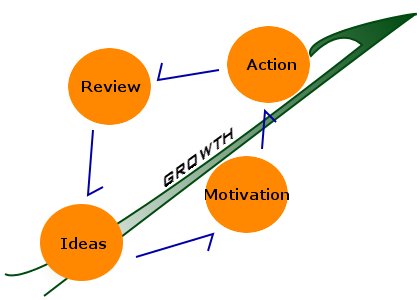
Don’t forget that this can also be used if you have an idea that you want to express but can’t put it into words. I recently tacked up a complex diagram of the process of personal growth I made a few days ago. There are about a hundred words relating the overall spiraling process along with the tools and barriers for each stage. If you ever had a problem that you wanted to completely understand, try a visual representation.
Here is a more basic version of that diagram I made on my computer:
Diagrams for Planning
I used diagrams extensively when I was planning out the stages of longer projects and goals I had. Although a simple to-do list can work well when a project is progressed in a linear fashion, a more elaborate diagram can work better for more complicated tasks. It can illustrate all the possible courses of action and make it easier to decide what to do next at any stage.
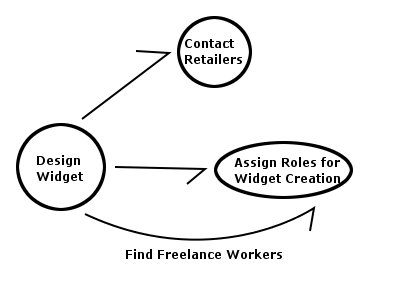
Using diagrams for planning can be especially helpful if there are multiple people and delegation of tasks involved. Team projects and strategies can be represented in a diagram far more efficiently and immediately communicate understanding to the rest of the group.
Brainstorming with Pictures
I have come across various brainstorming/mindstorming activities in my research into creativity. One of my favorites is to simply create a picture of ideas and link them together. Using this picture you can then mix and match ideas you previously thought were unrelated to create completely new ideas.
Starting with a central idea and expanding outwards with related ideas is the first place to start. Following this by looking for potential connections between completely different elements can spawn new ideas.
If I wanted to use this technique to come up with a blog entry I might start with a very generic center image like growth and then expand outwards with more specific ideas like emotional states, frustration, discipline, relationships, health, finances, etc. This process itself may create new ideas but by finding unseen links in ideas that weren’t connected at all, the true power of this technique shows through.
Try adding diagrams to your arsenal of understanding, planning and creativity tools. Even if you are perfectly happy with your lists, journal entries or planning lists, try a more visual approach and see if you find it effective. Although no technique can be perfect, there are many times when this tool works wonders.
 I'm a Wall Street Journal bestselling author, podcast host, computer programmer and an avid reader. Since 2006, I've published weekly essays on this website to help people like you learn and think better. My work has been featured in The New York Times, BBC, TEDx, Pocket, Business Insider and more. I don't promise I have all the answers, just a place to start.